
STEP 1
Go to Modules > Forms and select your form. Go to the Settings tab and change the form type to "Zone":
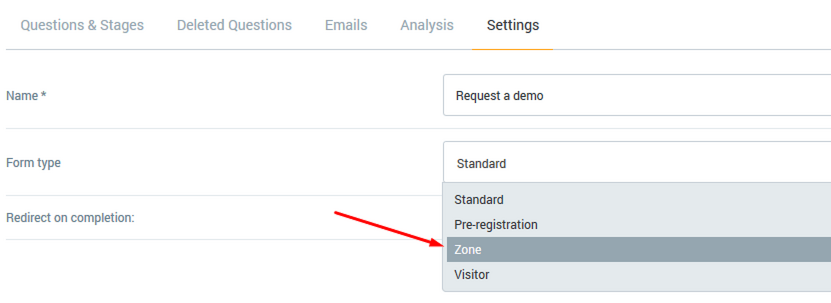
Changing this won't have any other effect on the form, it will just become available to add in the Ezone. If the form is submitted in the Ezone the exhibitor's name will also be recorded for reporting purposes.
STEP 2
Click Products on the left-hand menu (you may need to navigate to a previous browser tab), then click on the show title. From the tabbed options select Exhibitor Zone & then Event Status (you can add forms on a per status basis).
Click on the permissions tab and scroll down to the Forms section and check the box for the form to be used in the Ezone. Click on the form name for extra options or include it on the task list.
Comments
0 comments
Please sign in to leave a comment.