
ShowOff Changes
New Features
Filter active and inactive page sections
A new filter in the page editor lets you switch between All, Active and Inactive sections. Focus on your published content or quickly review sections that are no longer in use.

Inactive section alerts
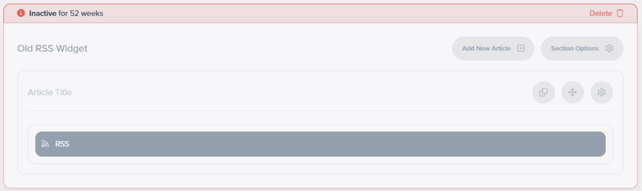
Sections that have been inactive for more than four weeks now display a notification in the page editor, helping you identify and review unused content.
Bug fixes/improvements
- Expanded E-Zone content restrictions: Content restriction settings now support up to 100 exhibitor groups, resolving missing options on websites with more than 10 groups.
- Deleted form questions: Deleted questions are now accessible to non-ASP users within the forms interface, allowing them to manage these questions without ASP assistance.
Composer 2 Changes
New Features
Person libraries
Create and manage a dedicated library of people independently of your speaker list. Person libraries are ideal for maintaining standalone profiles for past speakers, team members or other people you want to feature across your website.
Please note that Person library entries cannot be linked to seminar sessions.
Person libraries are currently available on Composer 2 websites. If you are not using Composer 2 and are interested in using this feature, please contact your Account Manager.
Countdown widget improvements
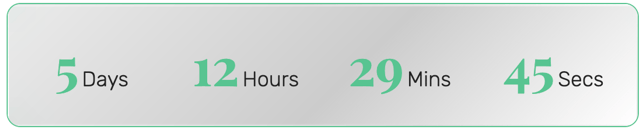
Our redesigned Countdown widget gives you more flexibility to promote your event and highlight important deadlines, with a wider range of layouts, display formats and styling options.
- Inline and boxed layouts: Choose a compact inline countdown or a boxed design, with options to group the time units together or display them in individual blocks.
- Flexible time formats: Select the time units to display, including formats with seconds, to suit your event countdown or campaign deadline.
- Shape options: Customise the presentation with options including square, circular and lozenge-shaped blocks.
- Digit and label styling: Adjust the appearance of the numbers and labels, including gradient styling for digits and the option to show or hide labels.
- Background effects: Choose background treatments, including a frosted-glass effect, to complement your page design.
- Borders and rounded corners: Refine the appearance with border and corner controls where supported by the selected layout and shape.
- Optional separators: Show and style separators between time units in supported layouts.
The new widget is available as Countdown in the widget picker and is included as a standard Composer 2 feature. It replaces the original widget for new additions; existing countdowns continue to work.
Choose whether filters open on page load
You can now choose whether supported list filters appear expanded or collapsed when visitors first load a page, making it easier to highlight the filtering options available.
This setting applies to lists using the Style 1 search form. The Style 2 sidebar continues to open by default.
H2 and H3 HTML heading options
The text editor now includes options to insert H2 and H3 HTML heading tags, making it easier to give pages a clear and meaningful structure for search engines and assistive technologies.
These options do not apply any visual styling by themselves. Existing text styling options can be used alongside the H2 and H3 tags to control how each heading looks.
Bug fixes/improvements
- Improved entry-page headings: Speaker, exhibitor, product and other entry pages now use the entry name as the page’s single H1 heading, providing a clearer content structure.
- Consistent section links: Section IDs now remain unchanged when sections are reordered, keeping section-specific links and custom styling consistent.
- Grouped Masonry seminar layouts: Fixed an issue that caused the Masonry layout to display incorrectly when sessions were grouped.
- Stages navigation arrows: Corrected navigation arrow placement in the Stages seminar layout, preventing overlap with the Style 7 sidebar menu.
- Mega Menu icons: Top-level items in the Style 8 Mega Menu now display their configured icons correctly.
- Clearer speaker field settings: Seminar list settings now show only the additional speaker fields supported by the website display.
- Simplified Card Overlay settings: Removed an unused image field from new Card Overlay widgets. Existing widgets using this field retain their images and editing options.
- Smoother image loading: Resolved an issue where oversized, unstyled images could briefly appear while content-heavy pages loaded.
- Reduced script size: Removed unnecessary and duplicate scripts to reduce the amount of JavaScript loaded by Composer 2 websites.
- More stable headers: Improved desktop, mobile and sticky header rendering to reduce visible movement as pages load.
- Optimised hero images: Improved responsive image delivery and loading behaviour in hero panels, including more appropriately sized images for mobile devices and reduced layout movement during loading.
API Changes
Retrieve recently updated records
The new modifiedSince query parameter allows integrations to request records updated on or after a specified date or time, reducing the need to retrieve complete datasets during each sync.
Supported resources include exhibitors, speakers, sessions, library entries and sessions within a specific seminar. The parameter accepts a UTC datetime or a date-only value.
Filter stands by active status
The /stands endpoint now supports filtering by active status. Use isActive=true to retrieve active stands or isActive=false to retrieve inactive stands.
Person library support
The library API now supports the new Person library type and its dedicated fields, allowing integrations to work with standalone person records.
Person library entries are separate from speaker records and cannot be linked to seminar sessions.
Comments
0 comments
Article is closed for comments.